


Accessory Sockets
Only use genuine Mazda accessories or the equivalent requiring no greater than 120 W (DC 12 V, 10 A).
Front
The ignition switch must be in the ACC or ON position.
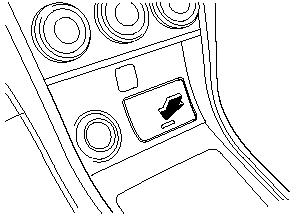
With Advanced Key
To use, press the cover and open it.
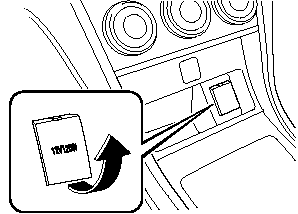
Without Advanced Key
Center Console
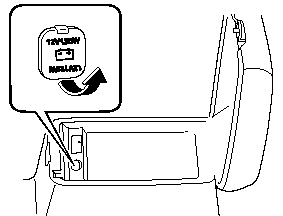
The accessory sockets can be used regardless of the position of the ignition switch.
CAUTION:
To prevent accessory socket damage
or electrical failure, pay attention to
the following:
 Do not use accessories that require
more than 120 W (DC 12 V, 10 A).
Do not use accessories that are not
genuine Mazda accessories or the
equivalent.
Close the cover when the accessory
socket is not in use to prevent
foreign objects and liquids from
getting into the accessory socket.
Correctly insert the plug into the
accessory socket.
Do not insert the cigarette lighter
into the accessory socket.
Noise may occur on the audio playback depending on the device connected to the accessory socket.
NOTE:
To prevent discharging of the battery, do not
use the socket for long periods with the engine
off or idling.
Connecting the accessory socket
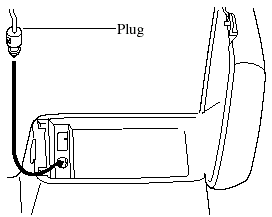
1. Open the lid.
2. Pass the connection plug cord through the cutout of the console and insert the plug into the accessory socket.
See also:
Driving on Uneven Road
Your vehicle's suspension and underbody can be damaged if driven on
rough/uneven roads
or over speed bumps at excessive speeds. Use care and reduce speed when
traveling on
rough/uneven roads or ...
Scheduled Maintenance (Mexico)
Follow Schedule 1 if the vehicle is operated mainly where none of the
following conditions
apply.
- Repeated short-distance driving.
- Driving in dusty conditions.
- Driving with extended use of ...
Front Seat Belt Pretensioner and Load Limiting Systems
For optimum protection, the driver and
front passenger seat belts are equipped
with pretensioner and load limiting
systems. For both these systems to work
properly you must wear the seat belt
pro ...