


Information Display
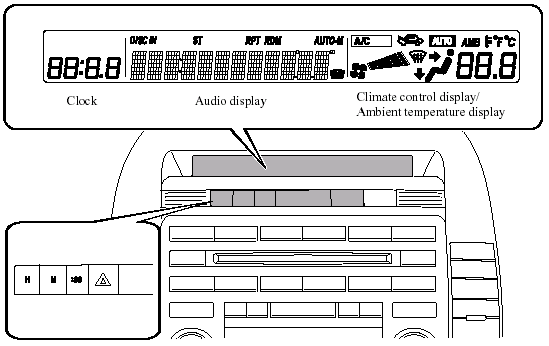
Information Display Functions
The information display has the following functions: - Clock.
- Ambient Temperature Display (Outside Temperature Display, Fully Automatic Type
Air
Conditioning System).
- Climate Control Display (Fully Automatic Type Air Conditioning System).
- Audio Display.

Clock
Time setting
1. Turn the ignition switch to the ACC or ON position.
2. Adjust the time using the time setting
buttons (  ,
,
 ).
).
The hours advance while the time
setting button () is pressed.
The minutes advance while the time
setting button () is pressed.
Time resetting
1. Turn the ignition switch to the ACC or ON position.
2. Press and hold the :00 button for 1.5 seconds or more. The displayed time flashes.
3. When the button is released, the time will be reset as follows:
(Example).
12:01 - 12:29→12:00.
12:30 - 12:59→1:00.
NOTE.
When the :00 button is released, the seconds will start at “00”.
Switching between 12 and 24-hour clock time
1. Turn the ignition switch to the ACC or ON position.
2. Press both time setting buttons ( ,
)
simultaneously for 1.5 seconds or
more.
3. “12h” or “24h” is displayed.
4. The selected clock time will be displayed within three seconds.

Ambient Temperature Display (Fully Automatic Type)
When the ignition switch is in the ON position, press the AMB switch to display the ambient temperature.
NOTE.
- Under the following conditions, the ambient temperature display may differ from the actual ambient temperature depending on the surroundings and vehicle conditions: - Significantly cold or hot temperatures.
- Sudden changes in ambient temperature.
- The vehicle is parked.
- l The vehicle is driven at low speeds.
- Press the AMB switch a few seconds or more to switch the display from Fahrenheit to Centigrade or vice versa.
- Press the AMB switch again to switch the display from ambient temperature to the temperature set for the air conditioner.
Climate Control Display (Fully Automatic Type)
The climate control system status is displayed. To operate the climate control system, refer to “Climate Control System”.
Audio Display
The audio system status is displayed. To operate the audio system, refer to “Audio System”.
See also:
Operating Tips for Audio System
WARNING.
Do not adjust the audio control
switches while driving the vehicle:
Adjusting the audio while driving the
vehicle is dangerous as it could
distract your attention from the
vehicle opera ...
Dynamic Stability Control (DSC)
The Dynamic Stability Control (DSC)
automatically controls braking and engine
torque in conjunction with systems such
as ABS and TCS to help control side slip
when driving on slippery surfaces, or ...
Outside the United States
Government regulations in the United States require that automobiles meet
specific
emission regulations and safety standards. Therefore, vehicles built for use in
the United
States may differ fr ...