


Hood
WARNING:
Always check that the hood is closed
and securely locked:
A hood that is not closed and
securely locked is dangerous as it
could fly open while the vehicle is
moving and block the driver's vision
which could result in a serious
accident.
Opening the Hood
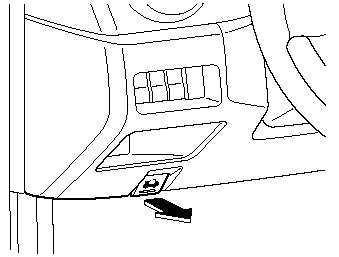
1. With the vehicle parked, pull the release handle to unlock the hood.
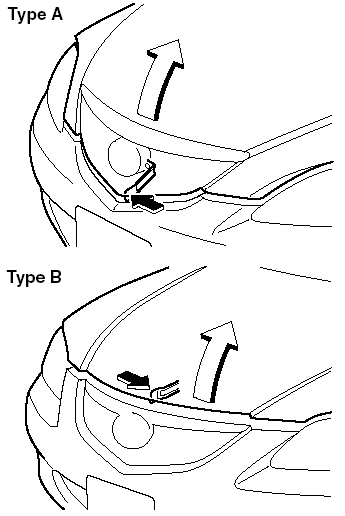
2. (Type A)
Insert your hand into the hood opening
and slide the hood latch to the left and
lift the hood.
(Type B)
Insert your hand into the hood opening
and slide the hood latch to the right and
lift the hood.
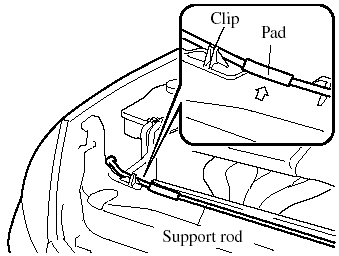
3. Grasp the support rod in the padded area indicated by the arrow.
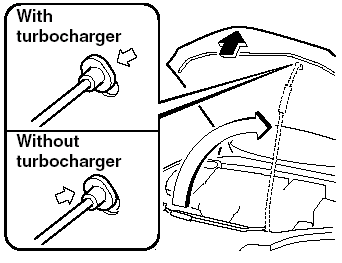
4. Secure the support rod in the stay hole indicated by the arrow to hold the hood open.
Closing the Hood
WARNING:
Do not leave items in the engine
compartment:
After you have finished checking or
doing servicing in the engine
compartment, do not forget and
leave items such as tools or rags in
the engine compartment.
Tools or other items left in the engine compartment could cause engine damage or a fire leading to an unexpected accident.
1. Check under the hood area to make certain all filler caps are in place and all loose items (e.g. tools, oil containers, etc.) have been removed.
2. Insert the support rod in its clip while holding up the hood. Verify that the support rod is secured in the clip before closing the hood.
3. Close the hood so that it locks securely.
See also:
Steps for Determining the Correct Load Limit:
Steps for Determining Correct Load Limit:
(1) Locate the statement “The combined weight of occupants and cargo should
never exceed XXX kg or XXX lbs” on your vehicle's placard.
(2) Determine the co ...
Under the Hood
Tribute buyers get the choice of a four-cylinder or V-6 engine. A manual
transmission is standard on the base model, and other models come with a
six-speed automatic transmission, which is availab ...
Exterior
The CX-9 manages to avoid the chunkiness of many SUVs, in part because of its
angular nose and carlike grille. The crossover's shoulder line rises as it heads
rearward, and the sides are free of c ...