


Turn and Lane-Change Signals
Turn Signal
Move the signal lever down (for a left turn) or up (for a right turn) to the stop position. The signal will self-cancel after the turn is completed.
If the indicator light continues to flash after a turn, manually return the lever to its original position.
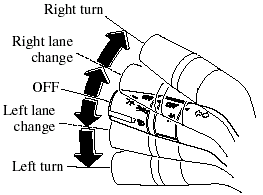
Green indicators on the dashboard show which signal is working.
Lane-change signals
Move the lever slightly toward the direction of the change ―until the indicator flashes― and hold it there. It will return to the off position when released.
NOTE:
- If an indicator light stays on without
flashing or if it flashes abnormally, one of
the turn signal bulbs may be burned out.
- A personalized function is available to change the number of flashes.Refer to Personalization Features.
- A personalized function is available to change the turn indicator sound volume.Refer to Personalization Features.
See also:
Exterior
Thanks to an arcing black garnish atop the air dam, the Mazda2 carries the
smiling expression Mazda has recently affixed to most of its cars. The lower air
dam dominates the Mazda2's nose; a thin ...
Rear Window Wiper and Washer
The ignition switch must be in the ON
position.
Rear WindowWiper
Turn the wiper on by turning the rear
wiper/washer switch.
ON ― Normal.
INT ― Intermittent.
Rear WindowWasher
To ...
Keyless Entry System
This system remotely locks and unlocks
the doors and the liftgate.
It can also help you signal for attention.
Press the buttons slowly and carefully.
CAUTION.
To avoid damage to the transmitter,
...