


Turn and Lane-Change Signals
Turn Signal
Move the signal lever down (for a left turn) or up (for a right turn) to the stop position. The signal will self-cancel after the turn is completed.
If the indicator light continues to flash after a turn, manually return the lever to its original position.
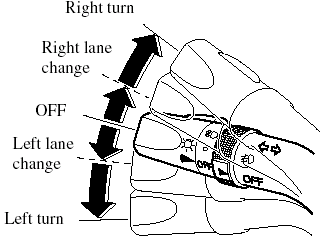
Green indicators on the dashboard show which signal is working.
Lane-change signals
Move the lever slightly toward the direction of the change ―until the indicator flashes― and hold it there. It will return to the off position when released.
NOTE:
If an indicator light stays on without flashing
or if it flashes abnormally, one of the turn
signal bulbs may be burned out.
See also:
Engine Exhaust (Carbon Monoxide)
WARNING:
Do not drive your vehicle if you smell exhaust gas inside the vehicle:
Engine exhaust gas is dangerous. This gas contains carbon monoxide (CO), which
is
colorless, odorless, and poisonou ...
Features
Mazda offers Sport, Touring and Grand Touring trim levels for both
four-cylinder and V-6 sedans, with increasing levels of equipment in each.
There's also a budget-minded SV four-cylinder trim lev ...
Basic Bluetooth Hands-Free Operation
Bluetooth Hands-Free Preparation
Language setting
English, Spanish, and Canadian French
are available. If the language setting is
changed, all of the voice guidance and
voice input commands are d ...