


AUX Mode (Auxiliary input)
You can connect portable audio units or similar products on the market to the auxiliary jack to listen to music or audio over the vehicle's speakers.
To use the auxiliary jack, pull up its cover.
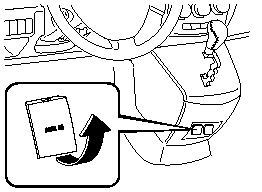
Type A
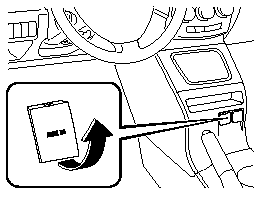
Type B
WARNING.
Do not adjust the portable audio unit
or a similar product while driving the
vehicle:
Adjusting the portable audio unit or
a similar product while driving the
vehicle is dangerous as it could
distract your attention from the
vehicle operation which could lead to
a serious accident. Always adjust the
portable audio unit or a similar
product while the vehicle is stopped.
Do not allow the connection plug cord
to get tangled with the parking brake
or the shift lever:
Allowing the plug cord to become
tangled with the parking brake or
the shift lever is dangerous as it
could interfere with driving, resulting
in an accident.
CAUTION.
 Close the cover when the auxiliary
jack is not in use to prevent
foreign objects and liquids from
penetrating the auxiliary jack.
Do not place objects or apply force
to the auxiliary jack with the plug
connected.
Noise may occur during playback
if the accessory socket equipped
on the vehicle is used. (If noise
occurs, do not use the accessory
socket.)
NOTE.
- Before using the auxiliary jack, read the manufacturer's instructions for the product being connected.
- Use a commercially-available, nonimpedance
(3.5  ) stereo mini plug for
connecting the portable audio unit to the
auxiliary jack. Before using the auxiliary
jack, read the manufacture's instructions
for connecting a portable audio unit to the
auxiliary jack.
- To prevent discharging of the battery, do not use the auxiliary input for long periods with the engine off or idling.
- Noise may occur depending on the product connected to the auxiliary jack.
- With regard to connecting a portable audio or similar device to a power source, use the battery for the device, not the accessory socket.
- Insert the plug to the auxiliary jack securely.
- Insert or remove the plug with the plug perpendicular to the auxiliary jack hole.
- Insert or remove the plug by holding its base.
To operate the portable audio unit
1. Turn the ignition switch to the ACC or ON position.
2. Insert the connection plug into the auxiliary jack.
3. Press the power/volume dial to turn the audio system on.
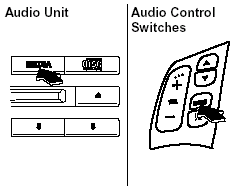
4. Press the source change button
( ) of the audio unit or the mode
switch ( ) of the audio control
switches on the steering wheel to
change to the AUX mode.
NOTE.
- Set the volume of the portable audio unit to the maximum within the range that the sound does not become distorted, then adjust the volume using the power/volume dial of the audio unit or the volume button ( +, -) of the audio control switch.
- If the connection plug is pulled out from the auxiliary jack while in AUX mode, noise may occur.
See also:
A Word to Mazda Owners
Thank you for choosing a Mazda. We at Mazda design and build vehicles with
complete
customer satisfaction in mind.
To help ensure enjoyable and trouble-free operation of your Mazda, read this
ma ...
Rear WindowWiper and Washer
The ignition switch must be in the ON
position.
Rear WindowWiper
Turn the wiper on by turning the rear
wiper/washer switch.
ON - Normal.
INT - Intermittent.
Rear WindowWasher
To spray wa ...
Practicality
Cars almost always make you compromise somewhere, and with a small car that
can be in its practicality. The Mazda2 is no exception. I'm a bigger guy, and
while I didn't feel cramped while driving ...