


Turn and Lane-Change Signals
Turn Signal
Move the signal lever down (for a left turn) or up (for a right turn) to the stop position. The signal will self-cancel after the turn is completed.
If the indicator light continues to flash after a turn, manually return the lever to its original position.
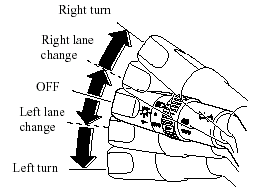
Green indicators on the dashboard show which signal is working.
Lane-change signals
Move the lever slightly toward the direction of the change - until the indicator flashes - and hold it there. It will return to the off position when released.
NOTE.
If an indicator light stays on without flashing or if it flashes abnormally, one of the turn signal bulbs may be burned out.
See also:
Mazda3 in the Market
I can't tell you how many times I've returned test cars thinking, "This
model's due for an update." That was the last thing on my mind when I handed
over the Mazda3. That means the 2010 ...
Features
When you test cars for a living, it's easy to fall for them from the driver's
seat. Testing a new Mercedes or even a new Toyota can be great — until you see
the price. Yes, we get sticker shock, t ...
Seat Belt
Fastening the Seat Belt
1. Grasp the seat belt tongue.
2. Slowly pull out the lap/shoulder belt.
3. Insert the seat belt tongue into the seat
belt buckle until you hear a click
sound.
WARNIN ...