


AUX Mode (Auxiliary input)
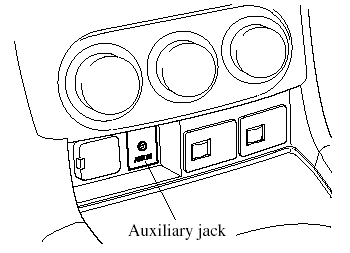
You can connect portable audio units or similar products on the market to the auxiliary jack to listen to music or audio over the vehicle's speakers.
WARNING:
Do not adjust the portable audio unit
or a similar product while driving the
vehicle:
Adjusting the portable audio unit or
a similar product while driving the
vehicle is dangerous as it could
distract your attention from the
vehicle operation which could lead to
a serious accident. Always adjust the
portable audio unit or a similar
product while the vehicle is stopped.
Do not allow the connection plug cord
to get tangled with the parking brake
or the shift lever:
Allowing the plug cord to become
tangled with the parking brake or
the shift lever is dangerous as it
could interfere with driving, resulting
in an accident.
CAUTION:
Noise may occur during playback if
the accessory socket equipped on the
vehicle is used. (If noise occurs, do
not use the accessory socket.)
NOTE:
- Before using the auxiliary jack, read the
manufacturer's instructions for the product
being connected.
- Use a commercially-available, nonimpedance (3.5 ) stereo mini plug for connecting the portable audio unit to the auxiliary jack. Before using the auxiliary jack, read the manufacture's instructions for connecting a portable audio unit to the auxiliary jack.
- To prevent discharging of the battery, do not use the auxiliary input for long periods with the engine off or idling.
- Noise may occur depending on the product connected to the auxiliary jack.
- With regard to connecting a portable audio or similar device to a power source, use the battery for the device, not the accessory socket.
- Insert the plug to the auxiliary jack securely.
- Insert or remove the plug with the plug perpendicular to the auxiliary jack hole.
- Insert or remove the plug by holding its base.
To listen to a portable audio unit
1. Turn the ignition switch to the ACC or ON position.
2. Insert the connection plug into the auxiliary jack.
3. Press the power/volume dial to turn the audio system on.
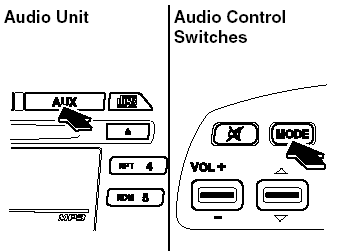
4. Press the AUX button (
) of the
audio unit or the mode switch (
 ).
).
of the audio control switches on the
steering wheel to change to the AUX
mode.
NOTE:
- Set the volume of the portable audio unit to
the maximum within the range that the
sound does not become distorted, then
adjust the volume using the power/volume
dial of the audio unit or the volume switch
(  ) of the audio control
switch.
- Use your portable audio unit for operations other than volume adjustment.
- If the connection plug is pulled out from the auxiliary jack while in AUX mode, noise may occur.
See also:
Interior
The Tribute has seating for five, and there's about 99 cubic feet of
passenger space, which is less than the RAV4 and CR-V but more than the Vue. The
Tribute has a 60/40-split folding rear seat. W ...
Hands-Free Telephone Setting
Mobile phone
Mobile phone registration
For the registration of a Bluetooth
equipped mobile telephone to Bluetooth
Hands-Free, refer to “Bluetooth Hands-
Free preparation”.
Registered mobile phon ...
Lighting Control
Headlights
Type A (Without AUTO position)
Turn the headlight switch to turn the
headlights, other exterior lights and
dashboard illumination on or off.
NOTE:
To prevent discharging the batte ...