


Turn and Lane-Change Signals
qTurn Signal
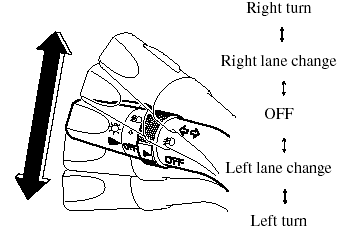
Move the signal lever down (for a left turn) or up (for a right turn) to the stop position. The signal will self-cancel after the turn is completed.
If the indicator light continues to flash after a turn, manually return the lever to its original position.
Green indicators on the dashboard show which signal is working.
Lane-change signals
Move the lever slightly toward the direction of the change ―until the indicator flashes― and hold it there. It will return to the off position when released.
NOTE:
If an indicator light stays on without flashing
or if it flashes abnormally, one of the turn
signal bulbs may be burned out.
See also:
Distributor in Each Area
qCANADA
Mazda Canada Inc.
55 Vogell Road, Richmond Hill,
Ontario, L4B 3K5 Canada
TEL: 1 (800) 263-4680 (in Canada).
(905) 787-7000 (outside Canada)
PUERTO RICO/U.S. Virgin Island
Plaza Motors C ...
Horn
To sound the horn, press the
mark on
the steering wheel. ...
Interior Care
Dashboard Precautions
Prevent caustic solutions such as perfume
and cosmetic oils from contacting the
dashboard. They'll damage and discolor it.
If these solutions get on the dashboard,
wipe them ...