


Your Vehicle at a Glance
Interior, exterior views and part identification of your Mazda.
Dashboard and Interior Overview
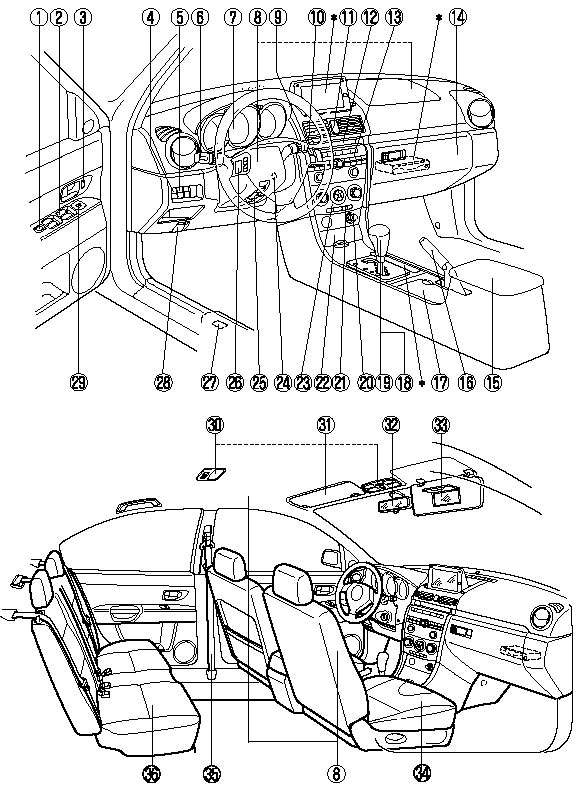
*Refer to Navigation System at the separate manual (if equipped).
1. Power window lock switch.
2. Power window switches.
3. Power door lock switch.
4. Headlight leveling switch.
5. Dashboard illumination switch.
6. Lighting control/Turn signal.
7. Instrument cluster.
8. SRS air bags.
9. Cruise control switches.
10. Wiper and washer lever.
11. Hazard warning flasher switch.
12. Information display.
13. Audio system.
14. Glove box.
15. Center console.
16. Parking brake.
17. Cup holder.
18. MT shift lever.
19. AT shift lever (Sport AT).
20. Lighter.
21. Rear window defroster switch.
22. Ashtray.
23. Climate control system.
24. Ignition switch.
25. Steering column release lever.
26. Audio control switches.
27. Remote fuel-filler lid release.
28. Hood release handle.
29. Outside mirror switch.
30. Interior lights.
31. Sunvisor.
32. Rearview mirror.
33. Vanity mirror.
34. Front seat.
35. Seat belt.
36. Rear seat.
Exterior Overview
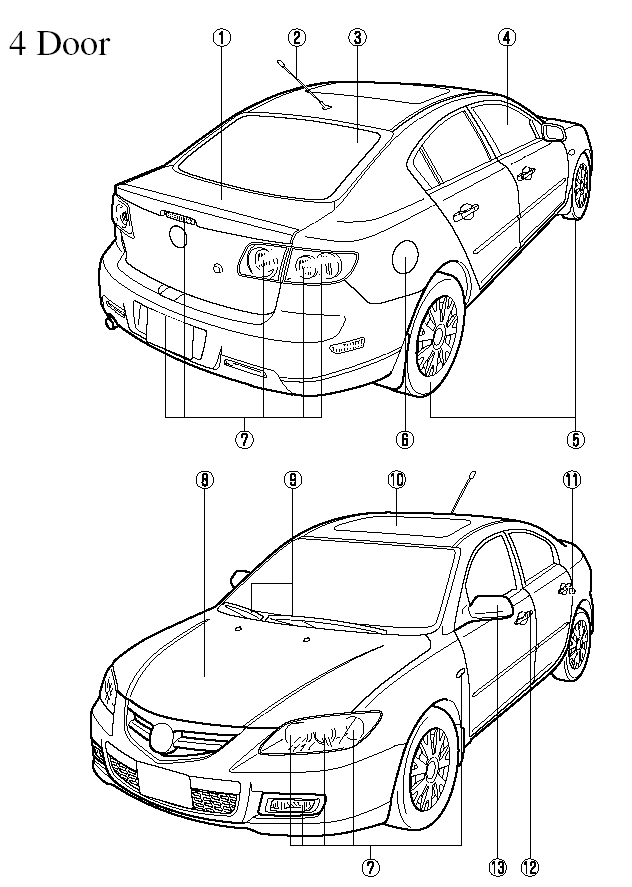
1. Trunk lid.
2. Antenna.
3. Rear window defroster.
4. Power window.
5. Tires.
6. Fuel-filler lid.
7. Light bulbs.
8. Hood.
9. Windshield wiper blades.
10. Moonroof.
11. Child safety lock.
12. Door lock.
13. Outside mirror.
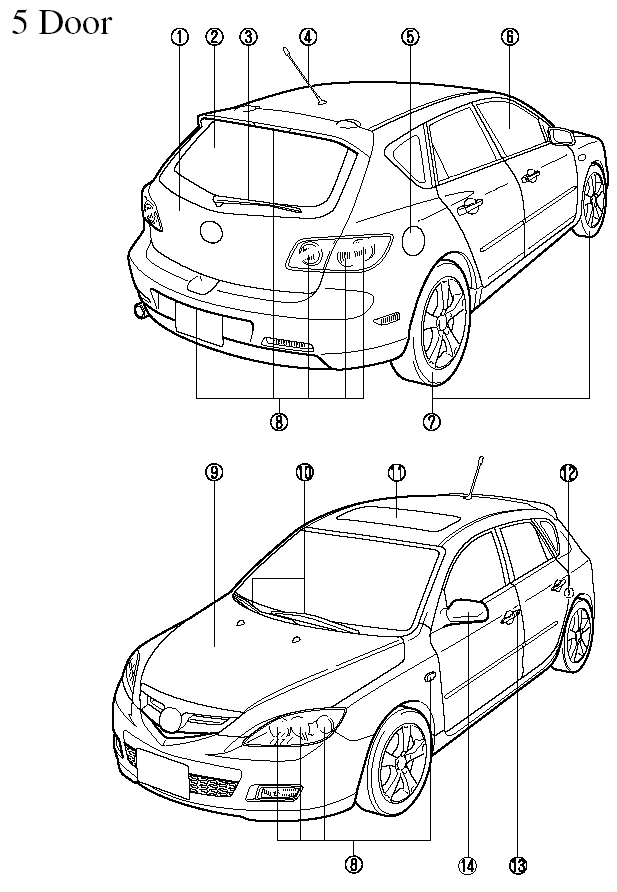
1. Liftgate.
2. Rear window defroster.
3. Rear wiper blade.
4. Antenna.
5. Fuel-filler lid.
6. Power window.
7. Tires.
8. Light bulbs.
9. Hood.
10. Windshield wiper blades.
11. Moonroof.
12. Child safety lock.
13. Door lock.
14. Outside mirror.
See also:
Wiper Blades
CAUTION:
Hot waxes applied by automatic
car washers have been known to
affect the wiper's ability to clean
windows.
To prevent damage to the wiper
blades, don't use gasoline,
kerosene, paint ...
Steps for Determining the Correct Load Limit:
Steps for Determining Correct Load Limit:
(1) Locate the statement “The combined weight of occupants and cargo should
never exceed XXX kg or XXX lbs” on your vehicle's placard.
(2) Determine the co ...
Interior Equipment (View A)
1. Power window lock switch.
2. Power window switches.
3. Door-lock knob.
4. Power door lock switch.
5. Outside mirror switch.
6. Headlight leveling switch.
7. TCS-OFF switch.
8. Lighting con ...