


Accessory Sockets
Only use genuine Mazda accessories or the equivalent requiring no greater than 120 W (DC 12 V, 10 A).
Front
The ignition switch must be in the ACC or ON position.
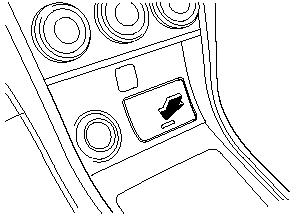
With Advanced Key
To use, press the cover and open it.
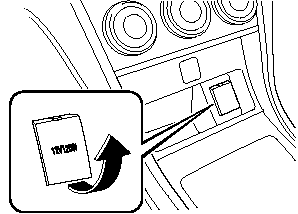
Without Advanced Key
Center Console
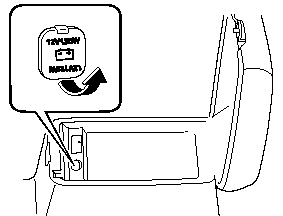
The accessory sockets can be used regardless of the position of the ignition switch.
CAUTION:
To prevent accessory socket damage
or electrical failure, pay attention to
the following:
 Do not use accessories that require
more than 120 W (DC 12 V, 10 A).
Do not use accessories that are not
genuine Mazda accessories or the
equivalent.
Close the cover when the accessory
socket is not in use to prevent
foreign objects and liquids from
getting into the accessory socket.
Correctly insert the plug into the
accessory socket.
Do not insert the cigarette lighter
into the accessory socket.
Noise may occur on the audio playback depending on the device connected to the accessory socket.
NOTE:
To prevent discharging of the battery, do not
use the socket for long periods with the engine
off or idling.
Connecting the accessory socket
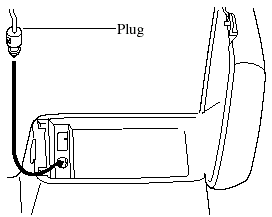
1. Open the lid.
2. Pass the connection plug cord through the cutout of the console and insert the plug into the accessory socket.
See also:
Body Lubrication
All moving points of the body, such as
door and hood hinges and locks, should
be lubricated each time the engine oil is
changed. Use a nonfreezing lubricant on
locks during cold weather.
Make sur ...
Liftgate
WARNING.
Never allow a person to ride in the
luggage compartment:
Allowing a person to ride in the
luggage compartment is dangerous.
The person in the luggage
compartment could be seriously
inj ...
Overheating
If the temperature gauge indicates
overheating, the vehicle loses power, or
you hear a loud knocking or pinging
noise, the engine is probably too hot.
WARNING:
Turn off the ignition switch and
...