


Information Display
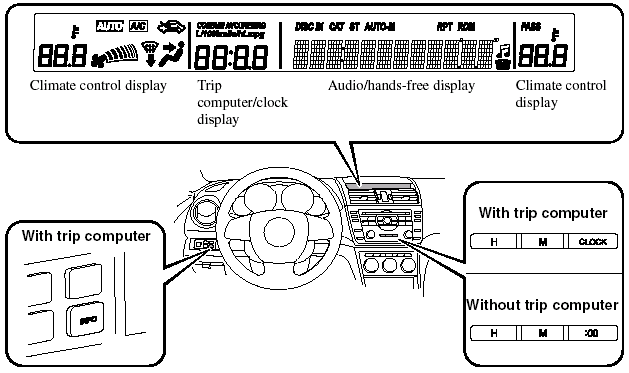
Information Display Functions
The information display has the following functions: - Clock.
- Climate Control Display (Fully Automatic Type Air Conditioning System).
- Audio Display.
- Trip Computer.
- Bluetooth Hands-Free Display Refer to Bluetooth Hands-Free.
Clock
NOTE:
When the trip computer is being displayed,
press the CLOCK button to change the display
to the time.

The time is displayed when the ignition is switched to ACC or ON.
Without navigation system
Time setting
1. Turn the ignition switch to the ACC or ON position.
2. Adjust the time using the time setting buttons (H,M
).
The hours advance while the time setting button (H
) is pressed.
The minutes advance while the time setting button (M
) is pressed.
Time resetting (Without trip computer type only)
1. Turn the ignition switch to the ACC or ON position.
2. Press and hold the :00 button for 1.5 seconds or more. The displayed time flashes.
3. When the button is released, the time will be reset as follows:
(Example).
12:01―12:29→12:00.
12:30―12:59→1:00.
NOTE:
When the :00 button is released, the seconds
will start at “00”.
NOTE:
(With trip computer type only).
The clock display can be switched on or off by pressing the CLOCK button.
With navigation system
Refer to the separate manual “NAVIGATION SYSTEM”.
NOTE:
Minutes and seconds are adjusted by the GPS,
however, it is necessary to adjust hours under
the following conditions:
- Driving across different time zones.
- Daylight saving time start and end.
Climate Control Display (Fully Automatic Type)
The climate control system status is displayed. To operate the climate control system, refer to “Climate Control System”.
Audio Display
The audio system status is displayed. To operate the audio system, refer to “Audio System”.
Trip Computer
The trip computer can display the
following:
- The current fuel economy.
- The average fuel economy.
- The approximate distance you can travel on the available fuel.
- The average vehicle speed.
Switch the ignition ON.
Press the INFO switch to change the display mode.
NOTE:
When the time is being displayed, press the
INFO switch to change the display to the trip
computer.
If you have any problems with your trip computer, consult an Authorized Mazda Dealer.
Current fuel economy mode
This mode displays the current fuel economy by calculating the amount of fuel consumption and the distance traveled.
Current fuel economy will be calculated and displayed every 2 seconds.
When this mode is selected, CONSUM CUR will be displayed.
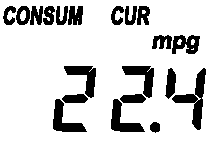
U.S.A.
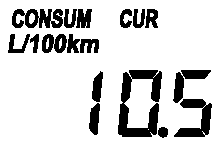
CANADA
When you've slowed to about 5 km/h (3 mph), — L/100 km (—mpg) will be displayed.
Average fuel economy mode
This mode displays the average fuel economy by calculating the fuel consumption and the distance traveled since connecting the battery or resetting the data.
Average fuel economy will be calculated and displayed every minute.
When this mode is selected, CONSUM AV will be displayed.
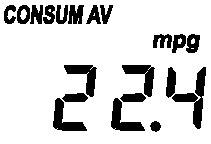
U.S.A.
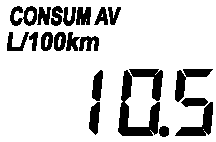
CANADA
To clear the data being displayed, press the INFO switch for more than 1.5 second.
After pressing the INFO switch, — L/100 km (— mpg) will be displayed for about 1 minute before the fuel economy is recalculated and displayed.
Distance-to-empty mode
This mode displays the approximate distance you can travel on the remaining fuel based on the fuel economy.
The distance-to-empty will be calculated and displayed every second.
When this mode is selected, REMNG will be displayed.
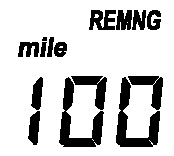
U.S.A.
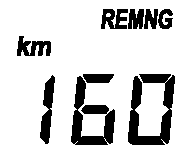
CANADA
NOTE:
- Even though the distance-to-empty display
may indicate a sufficient amount of
remaining mileage before refueling is
required, refuel as soon as possible if the
fuel gauge needle nears E or the low fuel
warning light illuminates.
- The display won't change unless you add more than approximately 20 L (5.3 gal) of fuel.
Average vehicle speed mode
This mode displays the average vehicle speed by calculating the distance and the time traveled since connecting the battery or resetting the data.
Average vehicle speed will be calculated and displayed every 10 seconds.
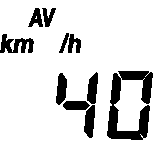
When this mode is selected, AV will be displayed.
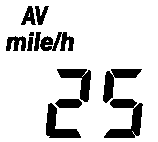
U.S.A.
CANADA
To clear the data being displayed, press the INFO switch for more than 1.5 second. After pressing the INFO switch, — km/h (— mile/h) will be displayed for about 1 minute before the vehicle speed is recalculated and displayed.
See also:
Going & Stopping
Mazda reportedly may offer a more fuel-efficient, normally aspirated
four-cylinder engine in the CX-7 down the line, but until then, the only
available drivetrain is a 244-horsepower, turbocharged ...
Exterior Care
Follow all label and container directions
when using a chemical cleaner or polish.
Read all warnings and cautions.
Maintaining the Finish
Washing
To help protect the finish from rust and
deterio ...
Essential Safety Equipment
Use of safety equipment, including seats, seat belt system, child-restraint
systems and SRS air bags. ...