


Hood
WARNING:
Always check that the hood is closed
and securely locked:
A hood that is not closed and
securely locked is dangerous as it
could fly open while the vehicle is
moving and block the driver's vision
which could result in a serious
accident.
Opening the Hood
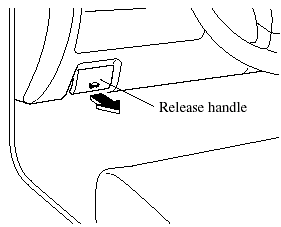
1. With the vehicle parked, pull the release handle to unlock the hood.
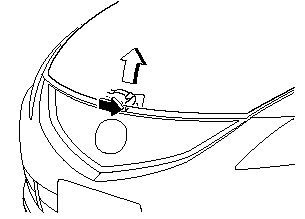
2. Insert your hand into the hood opening and slide the hood latch lever to the right and lift the hood.
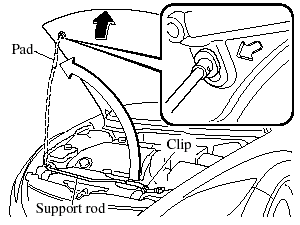
3. Grasp the support rod in the padded area and secure it in the stay hole indicated by the arrow to hold the hood open.
Closing the Hood
WARNING:
Do not leave items in the engine
compartment:
After you have finished checking or
doing servicing in the engine
compartment, do not forget and
leave items such as tools or rags in
the engine compartment.
Tools or other items left in the engine compartment could cause engine damage or a fire leading to an unexpected accident.
1. Check under the hood area to make certain all filler caps are in place and all loose items (e.g. tools, oil containers, etc.) have been removed.
2. Insert the support rod in its clip while holding up the hood. Verify that the support rod is secured in the clip before closing the hood.
3. Close the hood so that it locks securely.
See also:
Washer Fluid
qInspectingWasher Fluid Level
WARNING:
Use only windshield washer fluid or
plain water in the reservoir:
Using radiator antifreeze as washer
fluid is dangerous. If sprayed on the
windshield, it ...
Mazda Bluetooth Hands-Free Customer Service
For toll-free Bluetooth Hands-Free
customer service call 800-430-0153 or go
to www.MazdaUSA.com/bluetooth for
assistance. ...
Brake System
Foot Brake
Your Mazda has power-assisted brakes
that adjust automatically through normal
use.
Should power-assist fail, you can stop by
applying greater force than normal to the
brake pedal. But ...