


Turn and Lane-Change Signals
qTurn Signal
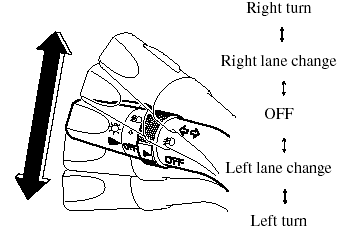
Move the signal lever down (for a left turn) or up (for a right turn) to the stop position. The signal will self-cancel after the turn is completed.
If the indicator light continues to flash after a turn, manually return the lever to its original position.
Green indicators on the dashboard show which signal is working.
Lane-change signals
Move the lever slightly toward the direction of the change ―until the indicator flashes― and hold it there. It will return to the off position when released.
NOTE:
If an indicator light stays on without flashing
or if it flashes abnormally, one of the turn
signal bulbs may be burned out.
See also:
Break-In Period
No special break-in is necessary, but a few
precautions in the first 1,000 km (600
miles) may add to the performance,
economy, and life of your Mazda.
- Do not race the engine.
- Do not maintain ...
Hazardous Driving
WARNING.
Be extremely careful if it is necessary to
downshift on slippery surfaces:
Downshifting into lower gear while
driving on slippery surfaces is
dangerous. The sudden change in tire
speed ...
Under the Hood
The 2.3-liter four-cylinder develops 156 hp while the 3.0-liter V-6 turns out
212 hp. Both engines can team with a five-speed manual transmission. A
five-speed automatic is available in models equ ...