


Information Display
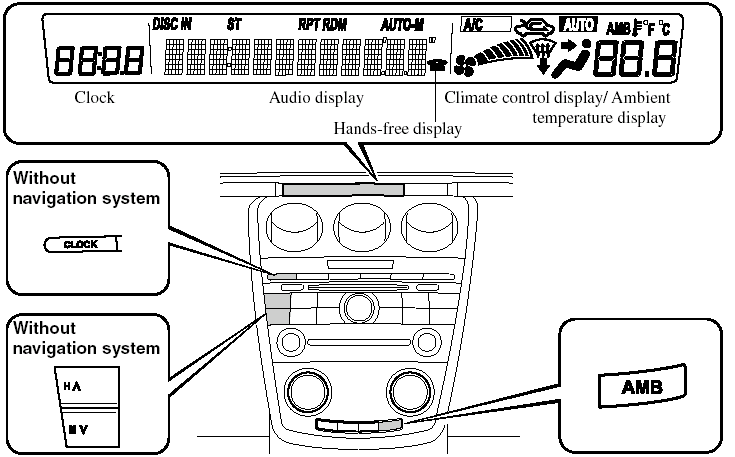
Information Display
Information Display Functions
The information display has the following functions: - Clock.
- Ambient Temperature Display (Outside Temperature Display, Fully Automatic Type).
- Climate Control Display (Fully Automatic Type).
- Audio Display.
- Bluetooth Hands-Free Displayí(Refer to “the Bluetooth Hands-Free”).
Clock

When the ignition switch is in the ACC or ON position, the time is displayed.
Without navigation system
Time setting
1. Press the CLOCK switch 1.5 seconds or more and the displayed time flashes.
2. Press the H switch to set the hour.
3. Press the M switch to set the minutes, then press the CLOCK switch.
Switching between 12 and 24-hour clock time
1. Press the audio control dial several times until 12Hr and 24Hr clock time are displayed.
2. Turn the audio control dial in either direction, select the desired clock setting, and then press the audio control dial. Press the dial while the preferred clock time is flashing.
With navigation system
Refer to the separate manual “NAVIGATION SYSTEM”.
NOTE:
Minutes and seconds are adjusted by the GPS,
however, it is necessary to adjust hours under
the following conditions:
- Driving across different time zones.
- Daylight saving time start and end.
Ambient Temperature Display (Fully Automatic Type)
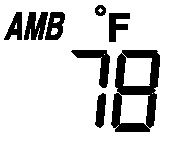
When the ignition switch is in the ON position, press the AMB switch to display the ambient temperature.
NOTE:
- Under the following conditions, the ambient
temperature display may differ from the
actual ambient temperature depending on
the surroundings and vehicle conditions:
- Significantly cold or hot temperatures.
- Sudden changes in ambient temperature.
- The vehicle is parked.
- The vehicle is driven at low speeds.
- Press the AMB switch a few seconds or more to switch the display from Fahrenheit to Centigrade or vice versa.
- (With fully automatic climate control system).
Press the AMB switch again to switch the display from ambient temperature to the temperature set for the air conditioner.
Climate Control Display
The climate control system status is displayed. To operate the climate control system, refer to “Climate Control System”.
Audio Display
The audio system status is displayed. To operate the audio system, refer to “Audio System”.
See also:
Parking in an Emergency
The hazard warning lights should always
be used when you stop on or near a
roadway in an emergency.
The hazard warning lights warn other
drivers that your vehicle is a traffic hazard
and that t ...
HomeLink Wireless Control System
NOTE:
HomeLink and HomeLink house are registered
trademarks of Johnson Controls.
The HomeLink system replaces up to 3
hand-held transmitters with a single builtin
component in the auto-dimming ...
CX-9 in the Market
Full-size truck-based SUVs were wildly popular in the '90s, but crossover
SUVs are (for the moment) the hot segment in the car business. The 2007 model
year saw the introduction of more than 10 ne ...