


Interior Lights
Illuminated Entry System
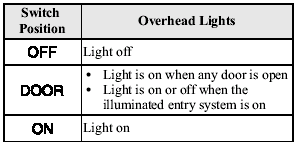
When the illuminated entry system
operates, the overhead light (switch is in
the DOOR position), the courtesy lights
and the ground illumination light turn on
for:
- About 30 seconds after the driver's
door is unlocked and the ignition key is
removed (without advanced key) or the
ignition is switched off (with advanced
key).
- About 15 seconds after all doors are closed.
(With Advanced key).
About 5 seconds after all doors when the advanced key is outside of the vehicle.
- About 15 seconds after the ignition is switched off (LOCK) and the ignition key removed (without advanced key) with all doors closed.
The light also turns off when: - The ignition is switched on and all doors are closed.
- The driver's door is locked.
NOTE:
- Battery saver.
If any door is left opened, the light turns off after about 30 minutes to save the battery.
The light turns on again when the ignition is switched on, or when any door is opened after all doors have been closed.
- The operation of the illuminated entry system can be changed.
Refer to Personalization Features.
Overhead Lights
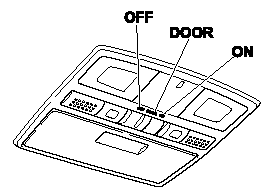
Front
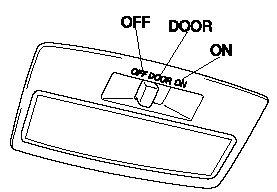
Rear
Map Lights
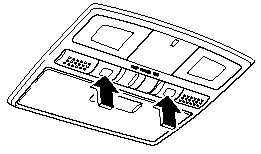
The map lights are switched on or off by pressing the switches.
Courtesy Lights
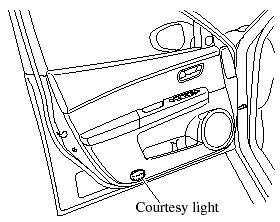
Turns on when any door is open or the illuminated entry system is on.
See also:
Under the Hood
The 2.3-liter four-cylinder develops 156 horsepower (146 hp for
PZEV-emissions-compliant models) while the 3.0-liter V-6 turns out 212 hp. Both
engines can team with a five-speed manual transmissi ...
Types of the Climate Control System
Manual type and fully automatic type climate control systems are explained
separately.
Check your vehicle's climate control type and read the appropriate pages.
Manual Type
Fully Automatic Ty ...
Rear
1 Trunk lid.
2 Antenna.
3 Doors and keys.
4 Outside mirror.
5 Tires.
6 Light bulbs. ...