


Turn and Lane-Change Signals
Turn Signal
Move the signal lever down (for a left turn) or up (for a right turn) to the stop position. The signal will self-cancel after the turn is completed.
If the indicator light continues to flash after a turn, manually return the lever to its original position.
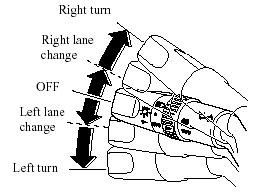
Green indicators on the dashboard show which signal is working.
Lane-change signals
Move the lever slightly toward the direction of the change - until the indicator flashes - and hold it there. It will return to the off position when released.
NOTE.
If an indicator light stays on without flashing or if it flashes abnormally, one of the turn signal bulbs may be burned out.
See also:
How to Minimize Environmental Paint Damage
The paintwork on your Mazda represents
the latest technical developments in
composition and methods of application.
Environmental hazards, however, can
harm the paint's protective properties, if
...
Overloading
WARNING:
Be careful not to overload your vehicle:
The gross axle weight rating (GAWR).
and the gross vehicle weight rating
(GVWR) of your vehicle are on the
Motor Vehicle Safety Standard Label
o ...
Still Looking Good
Perhaps a bit over the top when it first hit the streets back in 2006, the
CX-7's lines have matured well — especially considering that the compact-SUV
field, with the possible exception of the Fo ...