


Accessory Sockets
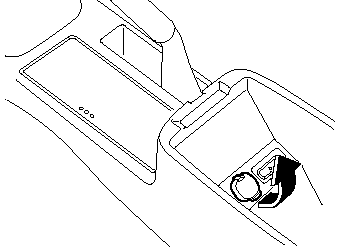
The ignition switch must be in the ACC or ON position to prevent the battery from discharging.
Only use genuine Mazda accessories or the equivalent requiring no greater than 120 W (DC 12 V, 7 A).
CAUTION:
To prevent accessory socket damage
or electrical failure, pay attention to
the following:
 Do not use accessories that require
more than 120 W (DC 12 V, 7 A).
Do not use accessories that are not
genuine Mazda accessories or the
equivalent.
Close the cover when the accessory
socket is not in use to prevent
foreign objects and liquids from
getting into the accessory socket.
Correctly insert the plug into the
accessory socket.
Noise may occur on the audio playback depending on the device connected to the accessory socket.
NOTE:
To prevent discharging of the battery, do not
use the socket for long periods with the engine
off or idling.
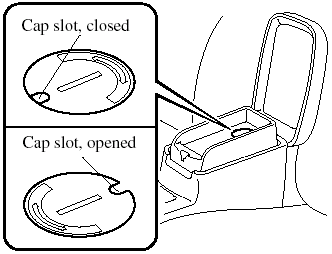
When placing an electrical device (e.g.
cellular phone) in the tray which is connected to the accessory socket, pass the connection plug cord through the slot in the cap.
1. Open the lid by pulling the upper release catch.
2. Remove the tray mat.
3. Using a coin, turn the cap counterclockwise (about 45° from the closed position) and remove it.
NOTE:
Do NOT discard the cap.
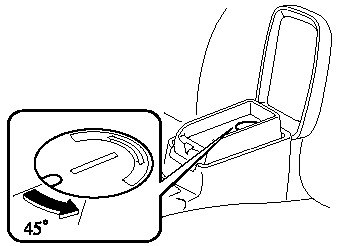
4. Open the tray by pulling the lower release catch.
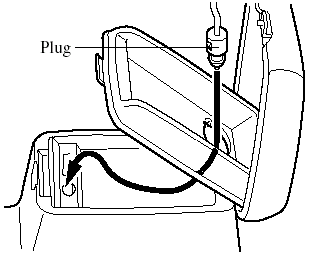
5. Pass the connection plug cord through the hole of the tray and insert the plug in the socket.
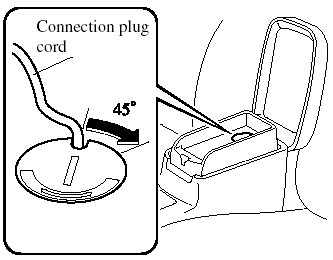
6. Make sure the connection plug cord is running through the cap slot; reinstall the cap and turn it clockwise (about 45° to the opened position).
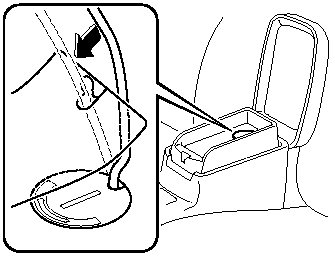
7. Pass the connection plug cord through the slit in the tray mat and then set the tray mat in place.
See also:
Cruise Control
With cruise control, you can set and
automatically maintain any speed of more
than about 30 km/h (19 mph).
WARNING:
Do not use the cruise control under the
following conditions:
Using the cruise ...
Human-Machine Interface now easier to Use
The facelift model has been upgraded with a newly-evolved human-machine
interface system (HMI), now with instruments that are easier to use. The numbers
in the driver instrumentation are larger an ...
When Bluetooth Hands-Free cannot be used
Bluetooth Hands-Free cannot be used
under the following conditions:
- The mobile telephone is outside of the
communication area.
- The mobile telephone has a
malfunction.
- The mobile telephone ...