


Turn and Lane-Change Signals
Turn Signal
Move the signal lever down (for a left turn) or up (for a right turn) to the stop position. The signal will self-cancel after the turn is completed.
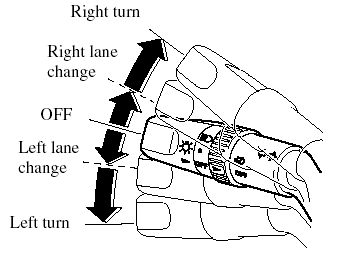
If the indicator light continues to flash after a turn, manually return the lever to its original position.
Green indicators on the dashboard show which signal is working.
Lane-change signals
Move the lever slightly toward the direction of the change ―until the indicator flashes― and hold it there. It will return to the off position when released.
NOTE:
If an indicator light stays on without flashing
or if it flashes abnormally, one of the turn
signal bulbs may be burned out.
See also:
MX-5 Miata in the Market
The Miata is one of those cars that we're happy to see enter the Cars.com
garage and sad to see go because it reminds us how much fun driving can be. The
fact that it's relatively affordable is ju ...
Customer Assistance (Canada)
Satisfaction Review Process
Your complete and permanent satisfaction is of primary concern to Mazda. All
Authorized
Mazda Dealers have both the knowledge and tools to keep your Mazda in top
cond ...
Hazard Warning Flasher
The hazard warning lights should always
be used when you stop on or near a
roadway in an emergency.
The hazard warning lights warn other
drivers that your vehicle is a traffic hazard
and that t ...