


Turn and Lane-Change Signals
qTurn Signal
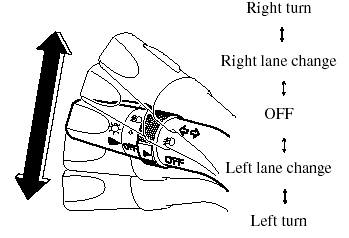
Move the signal lever down (for a left turn) or up (for a right turn) to the stop position. The signal will self-cancel after the turn is completed.
If the indicator light continues to flash after a turn, manually return the lever to its original position.
Green indicators on the dashboard show which signal is working.
Lane-change signals
Move the lever slightly toward the direction of the change ―until the indicator flashes― and hold it there. It will return to the off position when released.
NOTE:
If an indicator light stays on without flashing
or if it flashes abnormally, one of the turn
signal bulbs may be burned out.
See also:
Power Windows
The ignition switch must be in the ON
position for the power windows to
operate.
WARNING:
Make sure the opening is clear before
closing a window:
Closing power windows are
dangerous. A person's ...
Fuel-Filler Lid and Cap
WARNING:
When removing the fuel-filler cap,
loosen the cap slightly and wait for any
hissing to stop. Then remove it:
Fuel spray is dangerous. Fuel can
burn skin and eyes and cause illness
if in ...
Safety Certification
This CD player is made and tested to meet exacting safety standards. It meets
FCC
requirements and complies with safety performance standards of the U.S.
Department of
Health and Human Services. ...